


Jeff Flipper
Why pay for Claude Pro with crypto
Anthropic accepts credit and debit cards through Stripe. If your card works, subscribe directly at anthropic.com.
This guide is for everyone else. People in dozens of countries where Stripe declines transactions. People without access to international banking. People who prefer paying with crypto for privacy or convenience.
I started using this method three months ago after my fifth attempt to pay with a local card failed. The frustration was real. I had the money, I wanted the product, and the payment infrastructure said no.
Why crypto payments work for Claude Pro when credit cards fail
☞ No geographic restrictions. Works in countries where Stripe declines cards.
☞ No KYC required. No documents, no verification, no waiting.
☞ Fast processing. Most subscriptions arrive within a few hours.
☞ Multiple tokens supported. Pay with USDT, USDC, or SOL on six networks.
☞ Official Anthropic gift subscriptions. Identical access to credit card subscribers.
What you need to pay for Claude Pro with USDT or USDC
Before starting, you need:
☞ A crypto wallet with USDT, USDC, or SOL
☞ An email address for receiving the gift subscription
☞ The exact amount ready in your wallet
☞ Basic familiarity with sending crypto transactions
No KYC documents. No bank verification. No geographic restrictions.
This method of payment is fully supported by awesome SolCard.cc service (which backs ClaudeWithCrypto.com) I personally use to pay either for ChatGPT, Cursor, Webflow, Figma, Vercel and others.
So, ClaudeWithCrypto.com is powered by SolCard, a Solana-based payment service that also offers virtual cards for other subscriptions
Step ❶: Choose your Claude Pro plan and duration
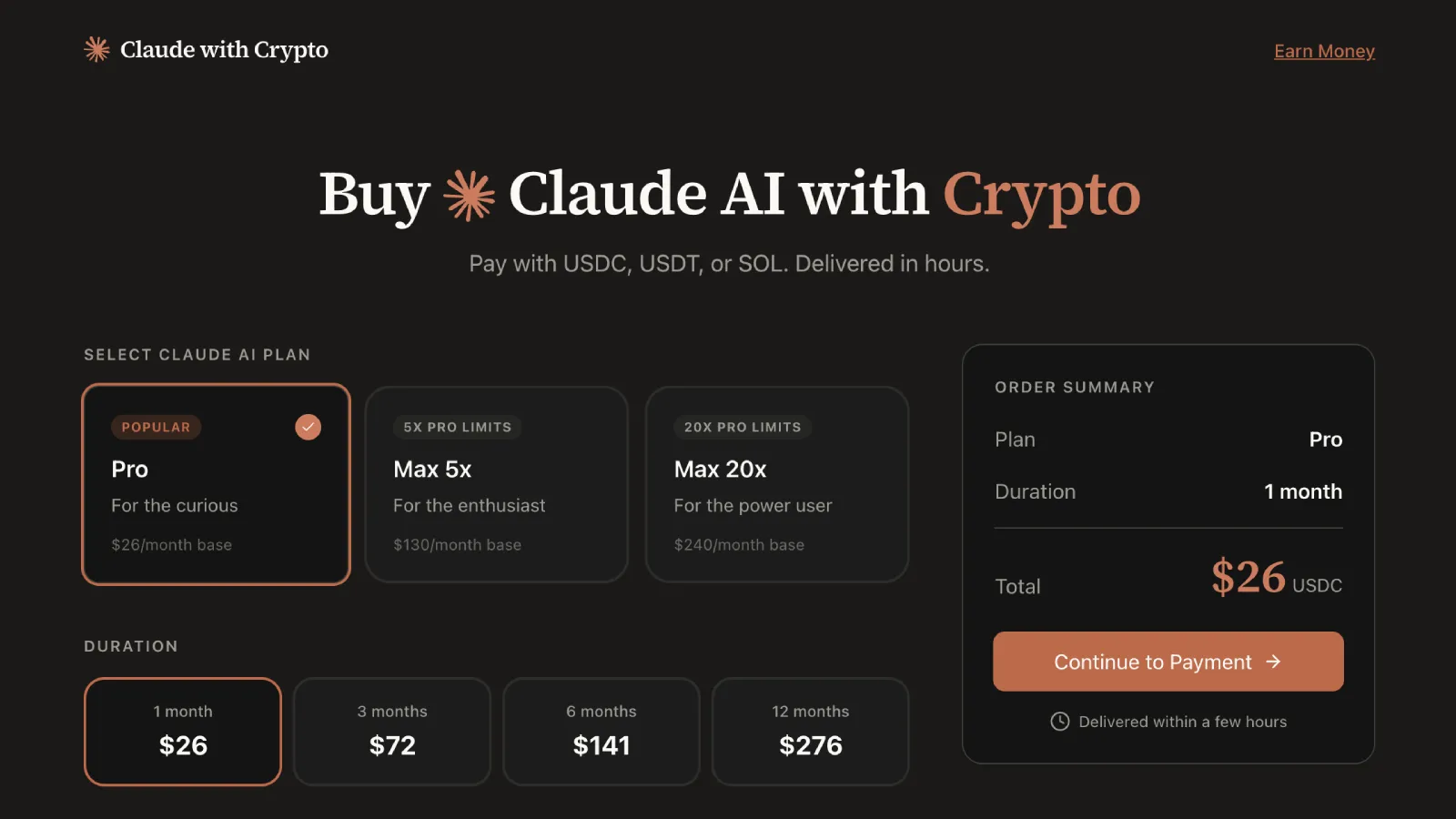
Visit ClaudeWithCrypto.com and select your subscription parameters.
Pick Pro unless you are running through limits daily. Max 5x is for heavy users who hit Pro caps regularly. Max 20x is for power users who need maximum capacity.
The only table you need:
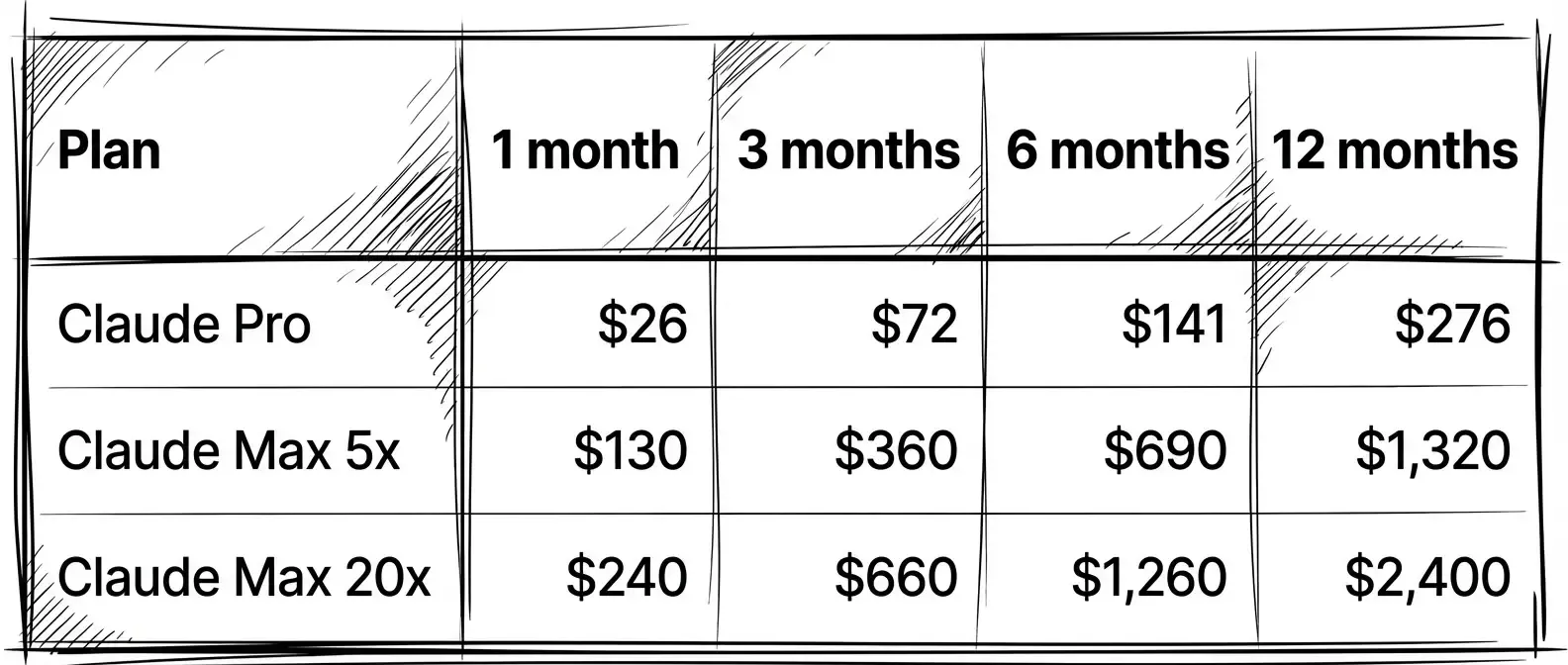
Longer durations reduce the effective monthly cost. The 12-month Pro plan works out to $23/month instead of $26. That saves you $36 over a year.
I chose 3 months for my first purchase. Long enough to commit, short enough to test the service. Now I buy 12 months at a time.
Select your plan and duration, then enter your email address. The website generates a unique deposit address for your USDT, USDC, or SOL transaction.
Step ❷: Get your USDT, USDC, or SOL deposit address
Each transaction gets a fresh, unique deposit address. This tracks your payment accurately without requiring account creation. It also rotates addresses for security.
The service supports six networks. Solana is my top choice for USDC and USDT. Transactions confirm in seconds and cost fractions of a cent. I use Solana for every payment.
Polygon works well too. Similar speed, similar fees for USDT and USDC.
Arbitrum, Base, and BSC are solid options. Slightly higher fees, still reasonable.
Ethereum mainnet is the expensive option. Gas fees can exceed some more bucks as the transaction comission during peak hours. On a $26 subscription, that adds 20% to your total cost. Avoid it unless you have no other option.
For SOL payments, Solana is your only network and supported by SolCard. Fees are negligible.
Your USDT, USDC, or SOL deposit address is unique to each transaction. Always verify the address before sending.
Step ❸: Send your USDT, USDC, or SOL payment
Open your wallet and send the exact amount to the deposit address displayed on claudewithcrypto.com/r/setproduct.
☞ Send only the exact amount shown. Overpayments and underpayments require manual resolution and delay your subscription.
☞ Send only on the network specified. Cross-chain sends to wrong networks result in lost funds.
☞ Double-check the address before confirming. I cannot stress this enough. One wrong character and your funds are gone. Crypto transactions are irreversible.
When sending USDT on Solana, confirmation takes 1-5 seconds. When sending USDC on Polygon, expect 5-30 seconds. Both are fast and cheap.
My first transaction took 47 minutes from payment to email. My second took three hours. Both worked perfectly. The service says to allow up to 6 hours, but in practice it is faster.
Peak periods like month start or holidays may take longer. Plan accordingly.
Step ❹: Activate your Claude Pro subscription
You receive an email from Anthropic containing your gift subscription link.
Click the link. Log in to your Anthropic account or create one if needed. The subscription activates immediately. Claude Pro features become available in your account right away.
Your Claude Pro subscription activates immediately, whether you paid with USDC, USDT, or SOL. Full Claude Pro access. Projects. Extended context. Priority capacity. No functional difference from a credit card purchase.
Your subscription does not auto-renew. This is intentional. When your subscription expires, purchase a new one through claudewithcrypto.com/r/setproduct.
To check expiration, navigate to Settings in your Claude account. The subscription end date appears there.
How to renew your Claude Pro crypto subscription
Since subscriptions do not auto-renew, plan your renewal approach.
Set a calendar reminder 3-5 days before expiration. Purchase your next subscription 1-2 days before the current one ends. Return to SolCard dashboard to renew with USDT, USDC, or SOL.
There is no penalty for overlapping subscriptions. They simply extend your access period.
For long-term users, the 12-month plan offers the best value and reduces renewal frequency to once per year.
Common issues with crypto payments for Claude Pro
Payment sent but no email received after 6 hours:
Check your spam folder first. Gift subscription emails come from Anthropic, not the payment service. If nothing in spam, contact the service through their website with your transaction hash.
Sent the wrong amount:
Transactions require manual intervention. Contact support with your transaction hash and the correct amount. Resolution typically takes 12-24 hours.
Sent on the wrong network:
This is critical. Cross-chain sends to incorrect networks may result in permanent loss of funds. Always verify the network matches the deposit address format.
Gift link expired:
Anthropic gift links remain valid for a limited time. Activate promptly after receiving. If your link expired, contact the payment service for a replacement.
Frequently asked questions about paying for Claude Pro with crypto
❶ Can I pay for Claude Pro with USDT?
Yes. USDT is supported on Solana, Ethereum, Polygon, BSC, Arbitrum, and Base networks. Solana and Polygon offer the lowest fees and fastest confirmation times.
❷ Can I pay for Claude Pro with USDC?
Yes. USDC is supported on all six networks including Solana. Solana USDC offers the lowest fees and fastest confirmation times.
❸ Can I pay for Claude Pro with SOL?
Yes. SOL payments process on the Solana network with negligible fees and near-instant confirmation.
❹ Is paying for Claude Pro with crypto legitimate?
Yes. The service purchases official Anthropic gift subscriptions on your behalf. You receive the same Claude Pro access as direct credit card subscribers.
❺ Does this work in countries where Stripe is not available?
Yes. Crypto payments bypass geographic restrictions entirely. No bank account or credit card required. For other subscription payments, SolCard also offers virtual cards without KYC.
❻ How long does it take to receive my Claude Pro subscription?
Most subscriptions arrive within a few hours of payment confirmation. Allow up to 6 hours during peak periods.
Security tips for paying Claude Pro with crypto
Use a dedicated wallet for subscription payments. This limits exposure if any address is compromised. Never share your seed phrase with any service. Verify deposit addresses each time.
The official service is accessible at claudewithcrypto.com/r/setproduct. Verify the domain before sending funds. Gift subscription emails come from anthropic.com. Check the sender address carefully. Never click gift links received from unofficial sources.
Why crypto payments work for Claude Pro when credit cards fail
Direct Stripe payment takes minutes but requires a supported card and geographic access. Gift subscription via crypto takes a few hours but works everywhere and requires no KYC.
P2P exchange plus a friend's card takes days, involves social dependency, and offers no guarantees. Virtual card services require KYC and still face geographic restrictions.
The crypto gift subscription method trades auto-renewal convenience for geographic freedom and privacy. For users blocked by traditional payment infrastructure, this trade-off makes sense.
I have been using this method for three months. Missing auto-renewal is annoying, but not being locked out of Claude is worth it. The $6 premium on a monthly Pro subscription buys access that Stripe simply cannot provide.